Water Source

Back to LG products

LG Water Source Multi V Water 5

LG Outdoor Units - Multi V Water Source Repair, maintenance, and replacement planning
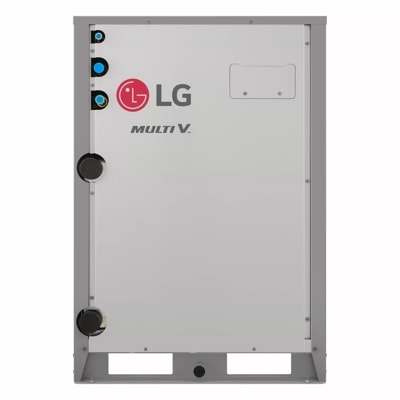
LG Multi V Water 5 product image

Technical Specifications

Product Specs

  • Brand: LG Air Conditioning Technologies
  • Product type: Water Source
  • Product group: Outdoor Units - Multi V
  • LG category: Outdoor Units
  • LG class: Multi V
  • LG line: Commercial
  • Model records in LG catalog: 27
  • Example model numbers: ARWM072BAS5, ARWM072DAS5, ARWM096BAS5, ARWM096DAS5, ARWM121BAS5, ARWM121DAS5, ARWM144BAS5, ARWM144DAS5, ARWM168BAS5, ARWM168DAS5, ARWM191DAS5, ARWM192BAS5, ARWM192DAS5, ARWM216BAS5, ARWM216DAS5, ARWM240BAS5
  • Catalog publish date: 06/21/2024
  • Model or series: Multi V Water 5
  • Equipment type: Water Source
  • System role: Ductless or mini-split system equipment
  • Application: Residential, light-commercial, or managed-property comfort applications
  • Compatibility check: Match with compatible indoor unit, coil or air handler, controls, refrigerant, voltage, and capacity.
  • Verified source: lghvac.com

Useful troubleshooting details

  • Confirm the exact LG model number, serial number, indoor/outdoor unit relationship, controller type, and connected zone count before scheduling.
  • Share photos of the indoor unit, outdoor unit, disconnect, controller, filter access, condensate routing, and any visible error code.
  • Note whether the concern is no cooling, no heat, weak airflow, water leak, noise, icing, control issue, short cycling, or uneven comfort.

Service planning

How GreenFlow handles Multi V Water 5 requests

1

Identify the equipment

Confirm the model or series name, serial number if available, photos, and whether the unit is roof, exterior, basement, or mechanical-room equipment.

2

Describe the service issue

Share no heat, no cooling, weak airflow, error codes, alarms, leaks, noise, control problems, or comfort complaints.

3

Review access and history

Include access notes, tenant or business-hour constraints, filter status, recent repairs, and maintenance records when available.

4

Plan the next step

GreenFlow can route the request for diagnostics, repair planning, maintenance, replacement scope, or related system upgrades.


Brands We Service

Popular cities

Service Areas

Our Happy Customers