HVAC controls and mobile app

Back to Hitachi products

Hitachi HVAC controls and mobile app airCloud Go / Hitachi controls ecosystem

Hitachi Controls HVAC controls and mobile app Repair, maintenance, and replacement planning
Hitachi airCloud Go / Hitachi controls ecosystem product image

Technical Specifications

Product Specs

  • Brand: Hitachi
  • Representative platform: airCloud Go controls
  • Equipment type: HVAC controls and mobile app
  • Connectivity: WiFi control on compatible Hitachi indoor units
  • Remote control: turn systems on/off and adjust temperature and fan speed from the app
  • Scheduling: weekly schedule control listed by source
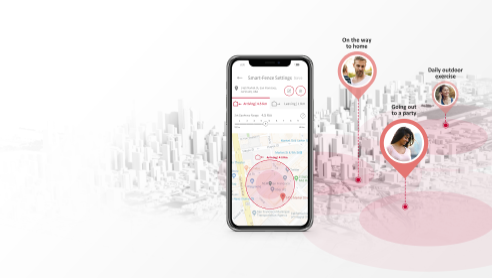
  • Location feature: Smart-Fence operation for arriving/leaving home scenarios
  • Voice control: Google Home and Amazon Alexa compatibility listed by source
  • Service focus: network pairing, controller compatibility, error codes, and indoor-unit communication
  • Model or series: airCloud Go / Hitachi controls ecosystem
  • Product group: Controls
  • System role: HVAC control, thermostat, sensor, or interface component
  • Application: Residential, light-commercial, or managed-property comfort applications
  • Compatibility check: Verify compatible equipment family, communication protocol, wiring, and control configuration.
  • Verified source: archiexpo.com

Useful troubleshooting details

  • Confirm the exact airCloud Controls model number, serial number, capacity, voltage, refrigerant or fuel type, controls, and matched equipment.
  • Share current symptoms, alerts or error codes, recent maintenance, access notes, and whether the issue is urgent or planned.
  • For replacement planning, note comfort goals, existing equipment age, and any heat-pump, electrification, or rebate-related questions.

Service planning

How GreenFlow handles airCloud Go / Hitachi controls ecosystem requests

1

Identify the equipment

Confirm the model or series name, serial number if available, photos, and whether the unit is roof, exterior, basement, or mechanical-room equipment.

2

Describe the service issue

Share no heat, no cooling, weak airflow, error codes, alarms, leaks, noise, control problems, or comfort complaints.

3

Review access and history

Include access notes, tenant or business-hour constraints, filter status, recent repairs, and maintenance records when available.

4

Plan the next step

GreenFlow can route the request for diagnostics, repair planning, maintenance, replacement scope, or related system upgrades.


Brands We Service

Popular cities

Service Areas

Our Happy Customers