Specialty Application Devices

Back to LG products

LG Specialty Application Devices Power Distribution Indicator (PDI)

LG Controls - Multi V, Multi Zone, Single Zone Specialty Application Devices Repair, maintenance, and replacement planning
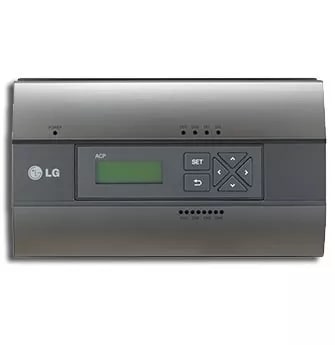
LG Power Distribution Indicator (PDI) product image

Technical Specifications

Product Specs

  • Brand: LG Air Conditioning Technologies
  • Product type: Specialty Application Devices
  • Product group: Controls - Multi V, Multi Zone, Single Zone
  • LG category: Controls
  • LG class: Multi V, Multi Zone, Single Zone
  • LG line: Commercial, Residential/Light Commercial
  • Model records in LG catalog: 1
  • Example model numbers: PQNUD1S41
  • Catalog publish date: 06/21/2024
  • Model or series: Power Distribution Indicator (PDI)
  • Equipment type: Specialty Application Devices
  • System role: HVAC control, thermostat, sensor, or interface component
  • Application: Residential, light-commercial, or zone-control comfort applications
  • Compatibility check: Verify compatible equipment family, communication protocol, wiring, and control configuration.
  • Verified source: lghvac.com

Useful troubleshooting details

  • Confirm the exact LG model number, serial number, indoor/outdoor unit relationship, controller type, and connected zone count before scheduling.
  • Share photos of the indoor unit, outdoor unit, disconnect, controller, filter access, condensate routing, and any visible error code.
  • Note whether the concern is no cooling, no heat, weak airflow, water leak, noise, icing, control issue, short cycling, or uneven comfort.

Service planning

How GreenFlow handles Power Distribution Indicator (PDI) requests

1

Identify the equipment

Confirm the model or series name, serial number if available, photos, and whether the unit is roof, exterior, basement, or mechanical-room equipment.

2

Describe the service issue

Share no heat, no cooling, weak airflow, error codes, alarms, leaks, noise, control problems, or comfort complaints.

3

Review access and history

Include access notes, tenant or business-hour constraints, filter status, recent repairs, and maintenance records when available.

4

Plan the next step

GreenFlow can route the request for diagnostics, repair planning, maintenance, replacement scope, or related system upgrades.


Brands We Service

Popular cities

Service Areas

Our Happy Customers