Gas furnace

Back to Trane products

Trane Gas furnace UD2B080ACV3

Trane Trane AHRI Furnace - XV80 Two-Stage Variable Speed Gas Furnace Gas furnace Repair, maintenance, and replacement planning
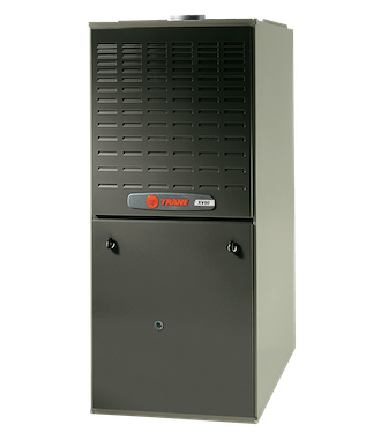
Trane UD2B080ACV3 product image

Technical Specifications

Product Specs

  • AHRI unit role: Furnace
  • AHRI model/pattern: *UD2B080ACV3
  • AHRI records represented: 4
  • AHRI equipment type: HP - Split System
  • AHRI refrigerant: R-410A
  • Verified catalog model: UD2B080ACV3
  • Verified product family: XV80 Two-Stage Variable Speed Gas Furnace
  • Verified catalog brand: Trane
  • Verified model family: XV80
  • AHRI furnace model/pattern: *UD2B080ACV3
  • Base furnace model: UD2B080ACV3
  • Nominal input: 80,000 BTU/h
  • AFUE: 80%
  • Heating stages: two-stage
  • Blower: variable-speed ECM
  • Combustion: non-condensing gas furnace
  • Configuration: upflow/horizontal
  • Blower tonnage: 3 ton
  • Cabinet width: 17.5 in.
  • Controls: Comfort-R variable-speed furnace family
  • Fuel type: gas
  • Application: matched gas furnace for split-system air conditioner or heat pump combinations
  • Official product page: https://www.trane.com/residential/en/products/furnaces/xv80/
  • Official product data: https://www.trane.com/content/dam/Trane/Commercial/global/products-systems/equipment/unitary/split-systems/gas-furnaces-indoor-coils/22-1673-10_05012015.pdf

Useful troubleshooting details

  • Confirm the installed model and serial number, matched indoor or outdoor equipment, voltage, refrigerant, controls, and AHRI certificate before service or replacement planning.
  • Use the linked AHRI certificates to verify matched-system combinations, rebate conversations, and equipment eligibility before quoting replacement work.
  • Collect photos of the nameplate, equipment access, recent fault history, and comfort symptoms before dispatch or proposal planning.

Service planning

How GreenFlow handles UD2B080ACV3 requests

1

Identify the equipment

Confirm the model or series name, serial number if available, photos, and whether the unit is roof, exterior, basement, or mechanical-room equipment.

2

Describe the service issue

Share no heat, no cooling, weak airflow, error codes, alarms, leaks, noise, control problems, or comfort complaints.

3

Review access and history

Include access notes, tenant or business-hour constraints, filter status, recent repairs, and maintenance records when available.

4

Plan the next step

GreenFlow can route the request for diagnostics, repair planning, maintenance, replacement scope, or related system upgrades.


Brands We Service

Popular cities

Service Areas

Our Happy Customers