
Commercial electric water heater

Back to Rheem products

Rheem PowerPack service and support

Rheem Commercial water heating Commercial electric water heater Repair, maintenance, and replacement planning
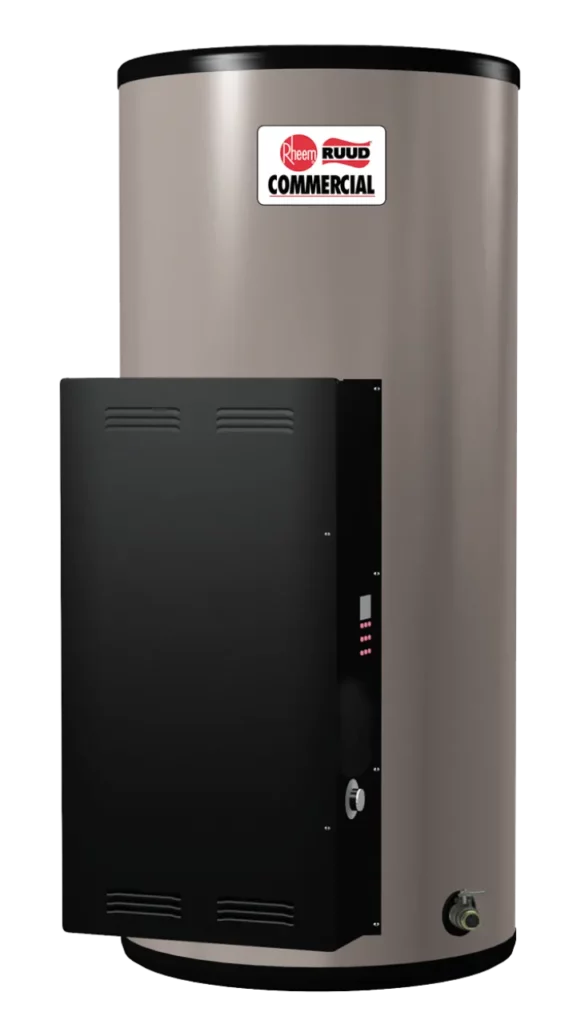
Rheem PowerPack product image

Product service snapshot

Rheem PowerPack service details

PowerPack is a Rheem commercial electric water heater product family in the commercial water heating catalog, used for model identification, diagnostics, maintenance, repair, and replacement planning.

  • Brand: Rheem
  • Model or series: PowerPack
  • Equipment type: Commercial electric water heater
  • Product group: Commercial water heating

Technical snapshot

PowerPack technical snapshot

Product Specs

  • Up to 36 KW
  • 208, 240, 277 and 480 voltages
  • System Sentinel™ LED diagnostic system
  • Immersion thermostat
  • Lifeguard™ stainless steel element
  • 12, 20, 30 and 40 gallon capacities
  • 3 KW - 36 KW
  • Capacity 13-40
  • SKU: E40A-27-G
  • Model: PowerPack
  • Tank Capacity: 40
  • Fuel: Electric
  • Height: 53.75"
  • Width: 2"
  • Official SKU example: E40A-27-G
  • Official product category: Commercial electric water heater
  • Brand: Rheem
  • Model or series: PowerPack
  • Equipment type: Commercial electric water heater
  • Product group: Commercial water heating
  • System role: Water-heating equipment for domestic or commercial hot-water loads
  • Application: Commercial, light-commercial, or managed-building HVAC and water-heating applications
  • Compatibility check: Verify fuel type, venting, electrical requirements, capacity, controls, and installation clearances.
  • Verified source: rheem.com

Useful troubleshooting details

  • Confirm the exact Rheem model or SKU, serial number, equipment age, and installation location before scheduling service.
  • Share photos of the data plate, equipment cabinet, nearby controls, access area, and any visible leaks, ice, alerts, or error codes.
  • For water-heating equipment, note hot-water symptoms, temperature swings, pressure concerns, venting, condensate, scale, and maintenance history.
  • Imported official SKU example: E40A-27-G.

Service planning

How GreenFlow handles PowerPack requests

1

Identify the equipment

Confirm the model or series name, serial number if available, photos, and whether the unit is roof, exterior, basement, or mechanical-room equipment.

2

Describe the service issue

Share no heat, no cooling, weak airflow, error codes, alarms, leaks, noise, control problems, or comfort complaints.

3

Review access and history

Include access notes, tenant or business-hour constraints, filter status, recent repairs, and maintenance records when available.

4

Plan the next step

GreenFlow can route the request for diagnostics, repair planning, maintenance, replacement scope, or related system upgrades.

PowerPack service questions

Can GreenFlow help with Rheem PowerPack service requests?

Yes. GreenFlow can help collect the right details for Rheem PowerPack service requests, including the model, symptoms, equipment age, building type, access notes, photos, and timing.

What symptoms should I mention for PowerPack?

Helpful symptoms include no heat, no cooling, weak airflow, control issues, tenant comfort complaints, water-loop or condensate concerns where relevant, access constraints, and whether one space or multiple zones are affected.

Is PowerPack used for residential or commercial properties?

Commercial equipment requests usually come from offices, restaurants, retail spaces, mixed-use buildings, multifamily common areas, schools, and managed properties where access and occupied-space comfort matter.

What helps schedule PowerPack service faster?

Share the exact model and serial number if available, clear photos of the equipment and surrounding access area, current symptoms, recent maintenance history, and whether the request is repair, maintenance, or replacement planning.